
Introducing A Simplified Employer Onboarding Process and Expanded Compare Access
This release introduces a new employer onboarding experience, expands Compare to include public organization profiles, and improves Tools & Technologies visibility across the platform.


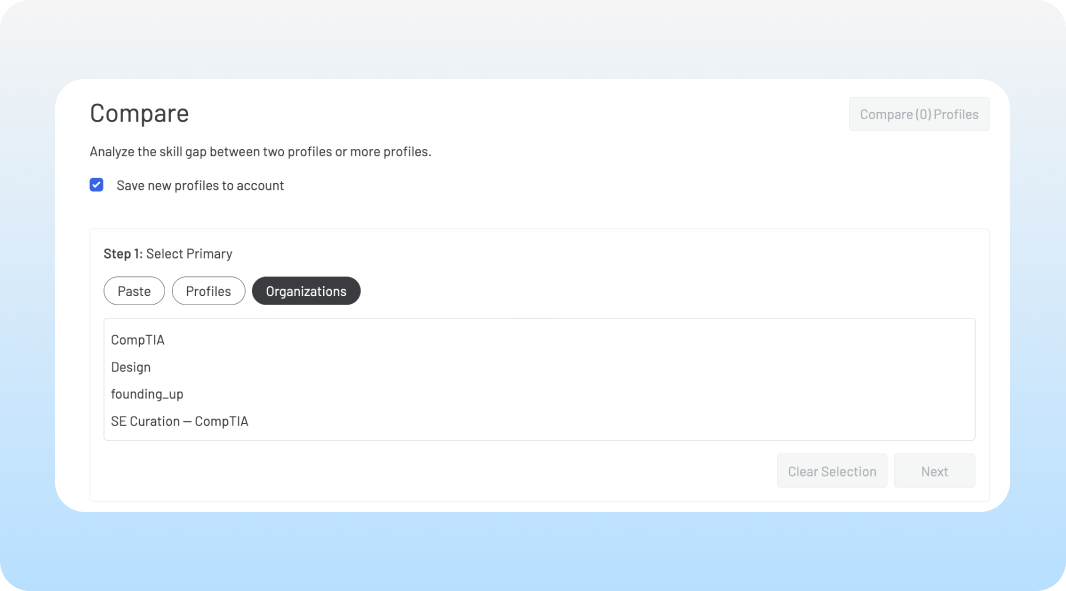
This release introduces a new employer onboarding experience, expands Compare to include profiles created by other organizations, and improves tool and technology skills visibility across the platform. We’ve also added a new Job profile type and made structural updates to improve onboarding and comparison workflows across the application.
Compare Enhancements:
You can now compare your profiles against public profiles created by other users across SkillsEngine.
- Any public profiles—those created within free accounts or from paid subscribers who have opted in—can be selected from the Organization tab in a Comparison.
- These profiles also now appear on the Target Jobs tab, allowing you to compare your curriculum against the skill profiles of real employer jobs.
- We have also streamlined how comparison reports are generated and accessed from different sections of the platform for a more consistent experience.
Simplified Employer Onboarding Experience:
We now offer a new, streamlined employer onboarding experience with our Instant Account Setup tool.
This feature allows employers to quickly begin engaging with the platform before they even log in or create an account. Employers simply upload their job descriptions, and our team will automatically create their organization's account, complete with pre-populated skill profiles generated for each of their roles.
Organization Types:
We are introducing Organization Type, a new feature that allows us to begin offering a more customized experience across the platform.
- All organizations now have an assigned type: employer, educator, industry group, or individual. This designation can be managed on the Organization Details page.
- All free accounts are automatically designated as individual accounts, a designation that cannot be changed at this time.
- Existing team or enterprise organizations have been assigned the closest corresponding type based on known details. To review and change the selected designation for your account, visit the Details page from your organization dashboard.
New Job Profile Type:
We’ve updated how user-created job-related profiles work in SkillsEngine, replacing the previous "Occupation" type with a more focused "Job" profile type.
Key Changes:
- Job Profiles: Now represent specific, role-based positions, providing a better alignment with real-world workflows. This is the profile type users will create going forward for all job-related (non-curriculum) profiles.
- Occupation Profiles: Now solely represent broad job families and are only accessible as templates within the SkillsEngine library.
Impact of this Update:
- All existing user-created profiles previously labeled as "Occupation" have been automatically converted to the new "Job" profile type.
Tool/Tech Skill Improvements:
Tool/Tech skills are now searchable in the skill set edit page and display properly in skill groupings across the platform.